Cambridge ALD: Difference between revisions
Jump to navigation
Jump to search
| Line 65: | Line 65: | ||
== Standard | == Standard Operating Procedure == | ||
===ALD1=== | |||
<div style="background-color: #c0c0c0; border: 1px solid #00000; padding: 10px; border-radius: 5px;"> | |||
====Loading==== | |||
# Log your process in the Excel notebook. | |||
# Check the nitrogen bottle: ''If line pressure is ~0bar, contact the cleanroom staff.'' | |||
# Make sure the valves of '''all''' precursors inside the ALD tool are closed. | |||
# Run recipe '''chamber prep''' to pump out any residual gas in the gas lines. | |||
# Press the round '''VENT''' button. | |||
# Open the metal lid. | |||
# Put your sample inside, roughly in the center, away from the gas inlet and outlet. | |||
#: Check whether the rubber O-ring is properly seated. | |||
# Close the metal lid. Check that the lid is aligned to sit directly on top of the reactor chamber. | |||
# Press the round '''PUMP''' button. | |||
# Place the metal cage on top of the tool. | |||
# Open relevant precursor valves. | |||
# Run your recipe. | |||
====Unloading==== | |||
# Close precursor valves. | |||
# Press the round '''VENT''' button. | |||
# Place the metal cage on the side of the tool. | |||
# Take out your sample. Check the rubber o-ring. | |||
# Press the round '''PUMP''' button. | |||
# Run recipe '''chamber_finalise'''. | |||
# Leave the system in the appropriate state. | |||
</div> | |||
== Witness samples == | == Witness samples == | ||
Revision as of 08:58, 15 June 2026
 | |
| Essentials | |
|---|---|
| Full name | Savannah S100 (gen. 1) |
| Manufacturer | Cambridge NanoTech (Veeco) |
| Description | Atomic layer deposition system |
| Location | Cleanroom 1 (03.2.209A) Cleanroom 2 (03.2.203B) |
| Responsibility | |
| Primary | Harry |
| Secondary | Martin |
Page last updated: 11 Nov 2025 Two nearly identical Savannah S100-like systems are used for atomic layer deposition of aluminum, hafnium, titanium, zirconium, and oxide.
Other material deposition alternatives at the NBI cleanroom:
- AJA systems for sputtering/e-gun evaporation
- E-Gun evaporator
- Edwards thermal evaporator
- Leica sputter coater
- Molecular beam epitaxy system
Growth per cycle (GPC) monitoring
-
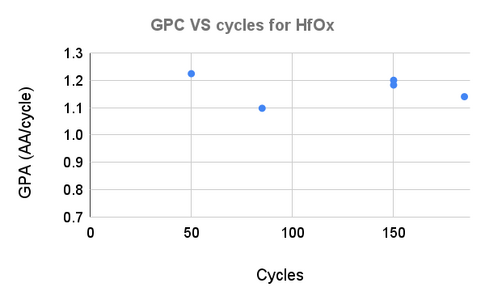 ALD1 HfOx
 -
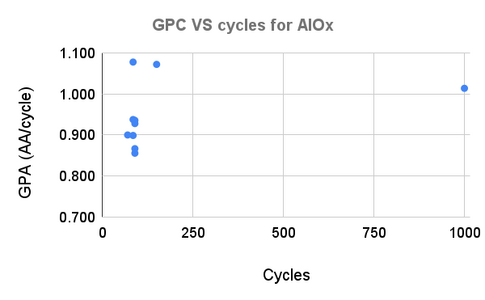 ALD1 AlOx
 -
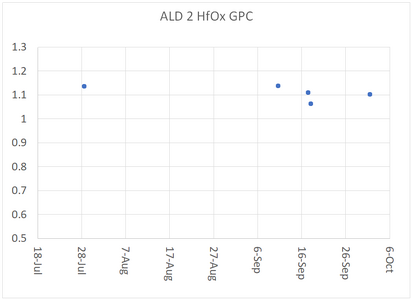 ALD2 HfOx


Available processes
| Deposited material | Precursor | ALD1 | ALD2 | Ref. |
|---|---|---|---|---|
| Hafnium oxide (HfOx, HfO2) | TDMAH
tetrakis(dimethylamino)hafnium [(CH3)2N]4Hf  |
Yes | Yes | [1] |
| Aluminum oxide (AlOx, Al2O3) | TMA
trimethylaluminum (CH3)3Al  |
Yes | Yes | [2] |
| Titanium oxide (TiOx, TiO2) | TTIP
Titanium(IV) isopropoxide Ti[OCH(CH3)2]4  |
Yes | No | [3] |
| Zirconium oxide (ZrOx, ZrO2) | TDMAZ
Tetrakis(dimethylamido)zirconium(IV) [(CH3)2N]4Zr  |
No | Yes | [4] |
Videos on operating the tools
Video on how to operate ALD 1:
Video on how to operate ALD 2:
Standard Operating Procedure
ALD1
Loading
- Log your process in the Excel notebook.
- Check the nitrogen bottle: If line pressure is ~0bar, contact the cleanroom staff.
- Make sure the valves of all precursors inside the ALD tool are closed.
- Run recipe chamber prep to pump out any residual gas in the gas lines.
- Press the round VENT button.
- Open the metal lid.
- Put your sample inside, roughly in the center, away from the gas inlet and outlet.
- Check whether the rubber O-ring is properly seated.
- Close the metal lid. Check that the lid is aligned to sit directly on top of the reactor chamber.
- Press the round PUMP button.
- Place the metal cage on top of the tool.
- Open relevant precursor valves.
- Run your recipe.
Unloading
- Close precursor valves.
- Press the round VENT button.
- Place the metal cage on the side of the tool.
- Take out your sample. Check the rubber o-ring.
- Press the round PUMP button.
- Run recipe chamber_finalise.
- Leave the system in the appropriate state.
Witness samples
In CR1 and CR2, you can find various witness samples depending on the properties that you would like to explore:
- Only thickness: Si (001) 1 inch wafers
- Thickness and breakdown voltage: Si (001) 15x15 mm2 back-side Au plated
It is recommended to ash the witness chips for 2 mins before loading them in the ALD tool.
File logs
- Recipe file location
- ALD1: C:\Savannah\Users\Standard\
- ALD2: C:\Cambridge Nanotech\Recipes\
- Log file location
- ALD1: C:\ALD data. Includes pressure data, screenshot at termination.
- ALD2: C:\Cambridge Nanotech\Log\. Includes pressure and heater temperature data, screenshot at termination, software event logs.
Troubleshooting
- Pressure reading obviously wrong (above 1e3 Torr or below 1e-4 Torr)
- Pressure gauge failure. Unplug the network cable from the small square pressure gauge beneath the chamber and plug it back in. The pressure reading should return to expected values.
- No peak visible during precursor pulse
-
- Precursor valves closed. Make sure the relevant precursor valves are open. Consult the labels on the inside of the door.
- Pulse time too short. Select the lowest plotting interval and check whether you can spot a small peak when the automatic valve opens. Increase pulse time as needed.
- Cannot open lid upon venting
-
- Chamber pressure still below atmosphere. Confirm pressure reading in software. If pressure is below 5e2 Torr, check whether the nitrogen bottle valve is open.
- Rubber O-ring can get stuck to the lid. Gently but firmly lift the lid. Reseat the O-ring if needed.
- What is the best plot time to graph the process pressure?
- It is recommended to plot only several pulses, for example 30 seconds or 1 minute total plot time. Setting this value to 1 hour during a run can reduce delay precision, because with a 1 hour plot time many data points need to be refreshed, which consumes a lot of processing resources. It is possible to set the plot time to 1 hour to get an overview of pulse heights, but plot times > 5 minutes are not recommended during a run. [1]
- What are the recommended heater temperatures?
- These are the recommended temperatures from the manual:
- Heaters for the trap (#6):150°C
- Stop valve (#7): 150°C
- ALD valve oven (#10): 150°C
- Precursor Manifold: 150°C
- Reactor heaters (#8 and #9): 100-200°C
- ALD1 (#8 and #9): 110°C
Remote access
- TeamViewer: ALD1, ALD2
- LogMeIn: ALD1 (CR1), ALD2 (CR2)
References
- ↑ Savannah Maintenance Manual